Nano Banana 2.1 Prompt Guide: Formulas, Templates & Examples
A useful prompt describes a result you can inspect. Start with a concrete subject, add the scene and visual treatment, then name the text and details that must stay. The templates below adapt examples from our Nano Banana 2.1 prompt library; they are starting briefs, not guarantees of a particular output.
The seven-part prompt formula
Subject → action or setting → style → lighting → camera → text → exclusions. You do not need all seven parts in every request. Include the details that matter, avoid contradictory instructions, and keep aspect ratio and output resolution in the composer settings.
1. Subject
Name the focal subject and the visible traits that matter. Avoid conflicting descriptions of the same person or object.
Weak: A person.
Stronger: An adult with freckles and curly auburn hair, wearing a cobalt blue linen shirt.
2. Action and setting
Describe what the subject is doing and where it belongs. A concrete setting gives the composition a clear direction.
Weak: Somewhere nice.
Stronger: Standing beside coral and yellow flowers in a sunlit garden, looking slightly past the camera.
3. Style
Choose a visual medium and a small number of compatible qualities. Mixing unrelated styles can make the result harder to evaluate.
Weak: Make it amazing.
Stronger: Natural editorial photography with realistic skin texture and an airy color palette.
4. Lighting
Specify direction and softness. Describe light in terms that can be checked in the output rather than using generic praise.
Weak: Good lighting.
Stronger: Soft window light from the left with gentle shadows and a restrained highlight on the cheek.
5. Camera and framing
Tell the model how to frame the scene. Lens wording is a visual instruction, not a guarantee of physical camera metadata.
Weak: A photo.
Stronger: Chest-up portrait at eye level, 85mm portrait-lens look, shallow depth of field, room above the head.
6. Exact text
Quote every required phrase, specify its location, and keep long copy out of small image regions. Proofread the generated result.
Weak: Add a title.
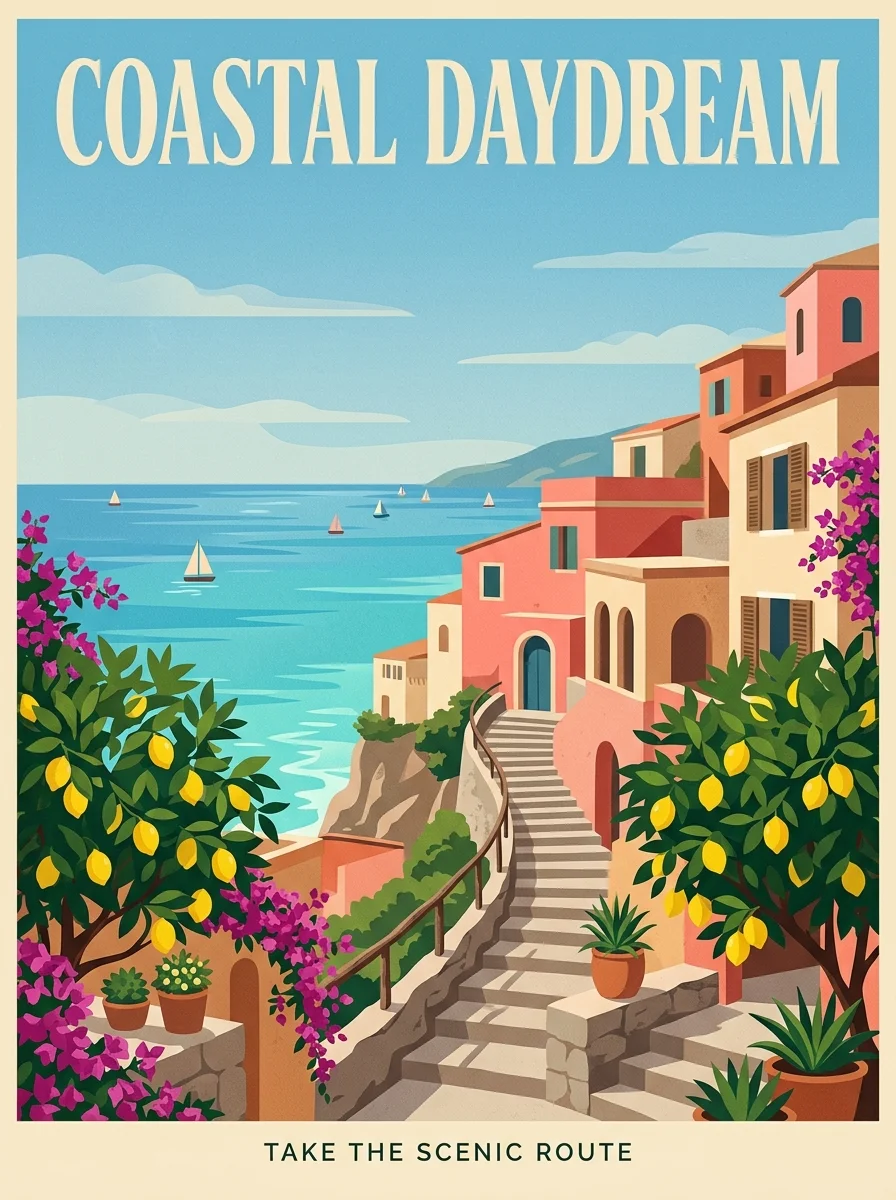
Stronger: Place the exact headline "COASTAL DAYDREAM" at the top and "TAKE THE SCENIC ROUTE" at the bottom. No other text.
7. Exclusions and preservation
Name the unwanted elements and the details that must remain. These are instructions to review, not a guarantee that every constraint will be met.
Weak: No mistakes.
Stronger: No extra text, logos or watermark. Preserve the reference subject’s face shape, hairstyle and shirt color.
Portraits: describe a person before a style
Start with the subject, setting and framing. Replace the clothing and background details with your own brief, then change one instruction per iteration. If you need to preserve a real person’s appearance, supply an authorized reference and check identity in the output.
Garden editorial portrait
Adapted from: Sunlit color story
Natural editorial portrait of an adult woman with freckles and curly auburn hair wearing a cobalt blue linen shirt, in a sunlit garden filled with coral and yellow flowers, bright airy daylight, relaxed candid expression, realistic skin texture, shallow depth of field, fashion magazine photography. No text, letters, logos or watermark. Adaptation: keep the portrait chest-up with the face in the upper third. Replace the shirt color and flower colors to match your campaign.
Window-light portrait
Adapted from: Cinematic window-light portrait
Cinematic close-up portrait of a young woman with short natural curls, soft window light from the left, shallow depth of field, muted olive and charcoal tones, 85mm lens, film grain, editorial photography Adaptation: reserve uncluttered space on the right for a caption that will be added later. Keep the background softly out of focus; no text in the generated image.
Product images: separate geometry from atmosphere
Name the product material, surface and background independently. When using a product reference, state which shape and packaging details must stay. Compare the output with the actual product before publishing a catalog or advertising image.
Citrus campaign bottle
Adapted from: Fresh perspective
Premium bright commercial still life of an unbranded frosted glass citrus drink bottle on a pale lavender plinth surrounded by orange slices, splash of sparkling water and green leaves, sky blue backdrop, crisp studio sunshine, polished realistic advertising photograph. The only text is the English word "FRESH" printed clearly on the bottle in modern sans serif. No other text, no logos, no watermark. Adaptation: keep the bottle centered and fully visible. Use the word "FRESH" only once. Leave clear space above the bottle for a separate campaign headline.
Perfume studio scene
Adapted from: Luxury perfume on black stone
Luxury amber perfume bottle on a wet black stone plinth, dramatic rim light, floating water droplets and mist, dark studio background, high-end commercial product photography, ultra sharp Adaptation: show the full bottle and cap in a three-quarter view. Keep the stone surface visible beneath it. No invented brand names, extra bottles or watermark.
Posters and infographics: write the copy explicitly
Text rendering is useful only when the words are correct and readable. Specify the complete headline, label order and hierarchy. Keep the first layout simple, then inspect spelling, repeated letters and the number of steps at the size your audience will see.
Travel poster with two text regions
Adapted from: Coastal daydream
Premium contemporary travel poster, a sunlit Mediterranean coast with turquoise water, coral pink buildings, a winding stairway and bright lemon trees, bold flat illustration with subtle paper grain, sky blue and warm cream palette. Large perfectly legible English headline "COASTAL DAYDREAM" at the top, small English footer "TAKE THE SCENIC ROUTE". No other text, no logos, no watermark. Adaptation: make the headline the largest text and the footer smaller. Keep both on flat, high-contrast areas rather than over detailed buildings.
Five-step coffee infographic
Adapted from: Coffee brewing infographic
Create a clean coffee process infographic titled "HOW COFFEE IS MADE", subtitled "From Bean to Cup". Show five numbered steps: HARVEST, DRY, ROAST, GRIND, BREW, with simple line icons on a charcoal background and gold details. All text must be in English. Adaptation: arrange the five steps in a single clear reading order. Include each label exactly once. Keep icons visually distinct and do not invent a sixth step.
Image-to-image edits: say what changes and what stays
These editing adaptations use existing gallery concepts as starting briefs, not as evidence of completed edits. Upload your own authorized source image, switch to the editing workflow, and identify the intended change. Review the whole result because details outside a requested region can change.
Change portrait clothing
Adapted from: Sunlit color story
Using @img1 as the source portrait, change the cobalt blue linen shirt to an ivory blazer. Preserve the person’s face, freckles, curly auburn hairstyle, pose, garden setting and soft daylight. Do not add accessories, text or a watermark. Compare the face and background with the source before accepting the edit.
Restage a product background
Adapted from: Luxury perfume on black stone
Using @img1 as the source perfume product photo, replace only the setting with a wet black stone plinth and dark studio backdrop. Keep the bottle shape, cap, color and existing label wording. Add soft rim light and a subtle mist behind the bottle. No additional products, labels or logos.
Multiple references: assign an explicit role to each image
Use one reference for identity and another for setting or style. State which source takes precedence if they conflict. Nano Banana 2.1 accepts up to 10 references here, but more inputs do not automatically produce a better result. Begin with only the references needed for the task.
One mascot in a greenhouse setting
Adapted from: Astronaut collectible figurine
Use @img1 for the astronaut bear’s identity, face markings, suit colors and body proportions. Use @img2 only for the mint-green greenhouse setting. Place the same bear beside the greenhouse door, soft daylight, playful 3D materials. Do not copy characters from @img2. No packaging, text or watermark.
One portrait identity in a new location
Adapted from: Sunlit color story
Use @img1 for the adult subject’s face, freckles, curly auburn hair and cobalt shirt. Use @img2 only for the flower-lined garden setting and daylight direction. Create a chest-up portrait of the same subject at eye level. Preserve identity traits; do not combine faces from the references. No text, logos or watermark.
PDF quick-reference sheet
Coming soon — awaiting the site owner’s PDF file. Use the formula and templates on this page while the downloadable sheet is being prepared.
Download PDF — coming soonFrequently asked questions
What is a useful Nano Banana 2.1 prompt formula?
Use subject, action or setting, style, lighting, camera or framing, exact text, and exclusions. Include only the parts that matter to your image. Make one clear first request, inspect the result, and change one instruction at a time.
How do I ask for readable poster text?
Put the required words in quotation marks, name the placement and hierarchy, and explicitly exclude extra text. Start with a short headline and simple layout. Check every character in the generated image before publishing; an instruction does not guarantee accurate spelling.
How do I keep a character consistent across images?
Supply an authorized identity reference and describe the traits to retain. Give each additional reference a separate role, such as scene or style. Keep the identity description stable between runs and compare face shape, clothing and markings in every result.
Can I download a Nano Banana 2.1 prompt PDF?
The PDF quick-reference sheet is not available yet. The site owner still needs to supply the file. The complete formula and editable templates are available on this page in the meantime; the download control is marked as coming soon.